I was pair programming over Zoom, sharing my terminal, and my partner asked me to scroll back to see a previous error. I couldn't. Terminal history doesn't scroll in screen share. That small friction made me finally learn tmux session management properly.
A few days later I watched a video by DDH about his tmux workflow with Opencode and Claude Code. Editor and AI assistant side by side, both aware of each other's state. I wanted that same flow, but with Neovim and Opencode instead.
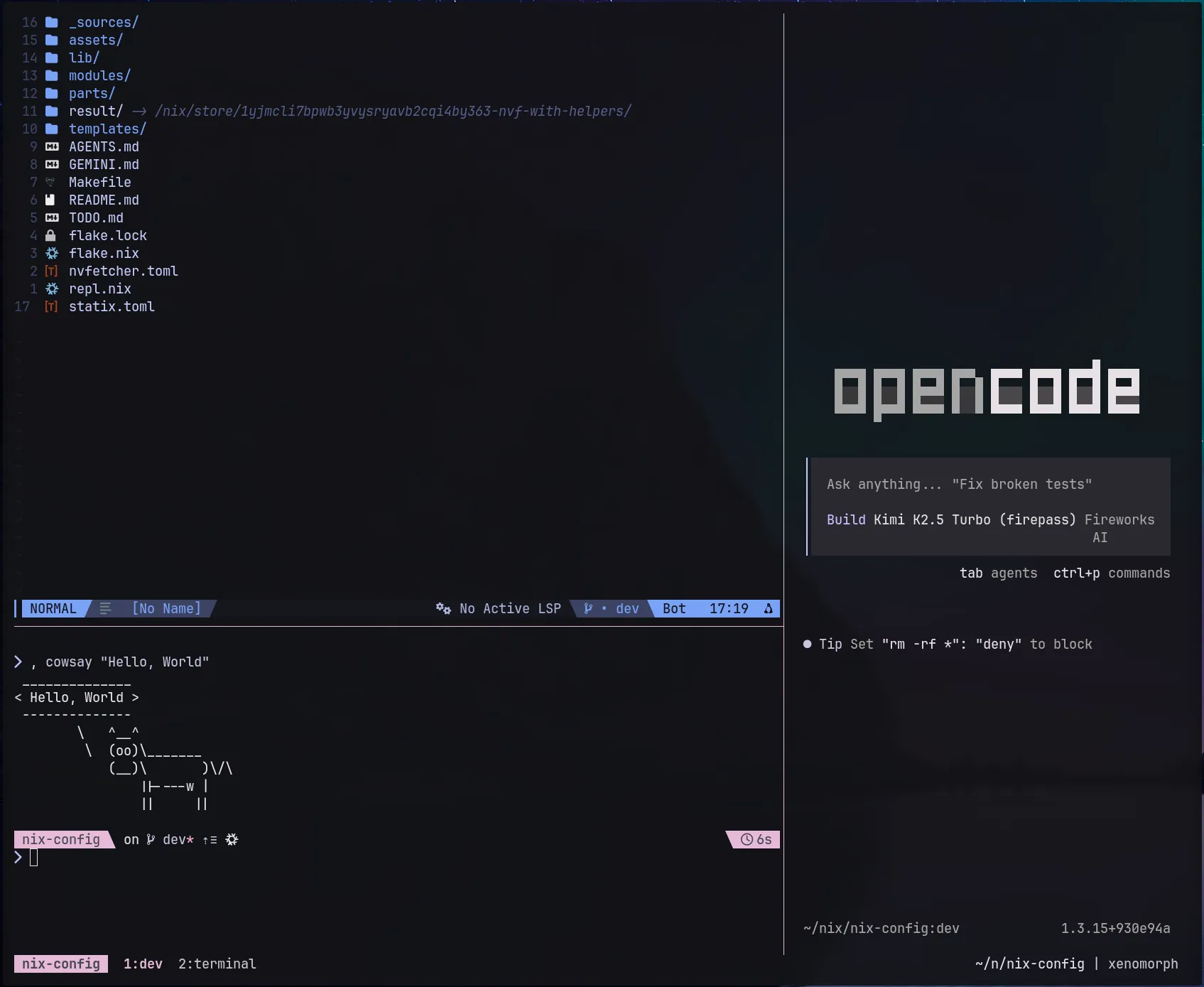
What I ended up with is a developer productivity workflow I call tdev. It's a single command that spins up a complete development environment with Neovim and Opencode side by side, connected via a local port for context sharing. Honestly, the whole point is keeping editor and AI assistant in sync: when I ask Opencode to "fix this function," Neovim has already told it which file and line I'm looking at. No more juggling terminals. No more losing state when I disconnect.
What tdev Actually Does
Running tdev in any project directory creates a tmux session with three components:
- A dev window with two panes: Neovim on the left (80% width) and Opencode on the right (20%)
- A terminal window for shell commands, git, tests, whatever doesn't fit in the editor
- Automatic port allocation so Neovim can send commands to Opencode's HTTP server
Here's the script that makes it happen:
#!/usr/bin/env bash
set -euo pipefail

TARGET_DIR="$PWD"
SESSION_NAME="${1:-$(basename "$TARGET_DIR")}"

# Attach to existing session if it exists
if tmux has-session -t "=$SESSION_NAME" 2>/dev/null; then
  echo "Session '$SESSION_NAME' already exists. Attaching..."
  exec tmux attach-session -t "=$SESSION_NAME"
fi

# Cleanup on error (only for new session creation)
trap 'if tmux has-session -t "=$SESSION_NAME" 2>/dev/null; then tmux kill-session -t "=$SESSION_NAME"; fi; exit 1' ERR

# Find next available port in the dynamic range (49152-65535 per IANA)
# This avoids conflicts with well-known ports (0-1023) and registered ports (1024-49151)
PORT=$(ss -tln | awk '{print $4}' | grep -oE '[0-9]+$' | sort -n | awk 'BEGIN{p=49152} {if($1==p) p++} END{print p}')

# Create session with nvim pane
NVIM_PANE=$(tmux new-session -d -s "$SESSION_NAME" -n dev -e "OPENCODE_PORT=$PORT" -P -F "#{pane_id}" "nvim .; exec $SHELL")
tmux select-pane -t "$NVIM_PANE" -T "Editor"

# Split and add opencode
OPENCODE_PANE=$(tmux split-window -h -p 20 -t "$NVIM_PANE" -P -F "#{pane_id}" "opencode --port $PORT; exec $SHELL")
tmux select-pane -t "$OPENCODE_PANE" -T "Opencode"

# Add a terminal window
tmux new-window -t "$SESSION_NAME" -n terminal -c "$TARGET_DIR"

# Remove error trap - session created successfully
trap - ERR

# Switch to dev window and attach
tmux select-window -t "$SESSION_NAME:dev"
tmux select-pane -t "$NVIM_PANE"
tmux attach-session -t "$SESSION_NAME"#!/usr/bin/env bash
set -euo pipefail

TARGET_DIR="$PWD"
SESSION_NAME="${1:-$(basename "$TARGET_DIR")}"

# Attach to existing session if it exists
if tmux has-session -t "=$SESSION_NAME" 2>/dev/null; then
  echo "Session '$SESSION_NAME' already exists. Attaching..."
  exec tmux attach-session -t "=$SESSION_NAME"
fi

# Cleanup on error (only for new session creation)
trap 'if tmux has-session -t "=$SESSION_NAME" 2>/dev/null; then tmux kill-session -t "=$SESSION_NAME"; fi; exit 1' ERR

# Find next available port in the dynamic range (49152-65535 per IANA)
# This avoids conflicts with well-known ports (0-1023) and registered ports (1024-49151)
PORT=$(ss -tln | awk '{print $4}' | grep -oE '[0-9]+$' | sort -n | awk 'BEGIN{p=49152} {if($1==p) p++} END{print p}')

# Create session with nvim pane
NVIM_PANE=$(tmux new-session -d -s "$SESSION_NAME" -n dev -e "OPENCODE_PORT=$PORT" -P -F "#{pane_id}" "nvim .; exec $SHELL")
tmux select-pane -t "$NVIM_PANE" -T "Editor"

# Split and add opencode
OPENCODE_PANE=$(tmux split-window -h -p 20 -t "$NVIM_PANE" -P -F "#{pane_id}" "opencode --port $PORT; exec $SHELL")
tmux select-pane -t "$OPENCODE_PANE" -T "Opencode"

# Add a terminal window
tmux new-window -t "$SESSION_NAME" -n terminal -c "$TARGET_DIR"

# Remove error trap - session created successfully
trap - ERR

# Switch to dev window and attach
tmux select-window -t "$SESSION_NAME:dev"
tmux select-pane -t "$NVIM_PANE"
tmux attach-session -t "$SESSION_NAME"
The thing about OPENCODE_PORT is that when Opencode starts with --port $PORT, it exposes an HTTP server with endpoints that Neovim uses to send commands to Opencode. So when I ask Opencode to "fix the function in the current buffer," Neovim has already told it which file and line I'm looking at.
Navigation Between Vim and tmux
But having two panes is useless if switching between them is annoying. The Neovim tmux integration comes from vim-tmux-navigator so that Ctrl+h/j/k/l works identically whether I'm in a Vim split or a tmux pane.
In Neovim, the same keys navigate between editor splits. When I reach the edge of Vim and hit Ctrl+l again, it jumps to the tmux pane on the right. The mental model is simple: I'm moving between editing surfaces, not thinking about "application boundaries."
I changed my prefix to Ctrl-Space because Ctrl-b conflicts with readline's backward-char. The window switching with Alt+Number is what I actually use daily: no prefix key, just Alt+2 to jump to the terminal window. It's fast enough that I actually use multiple windows now instead of cramming everything into splits.
The full configuration is in my dotfiles.nix repo under modules/shell/. The tmux setup is in tmux.nix, the tdev script is in scripts/tdev.sh, and the Neovim navigator config is in modules/neovim/_tmux.nix. Everything is managed as a Nix flake, so the whole setup is reproducible across machines.
The Hidden Cost: Quick Edits Become a Production
The tdev workflow is great for deep work. But it's overkill when I just need to change one line in a config file. Spinning up a whole tmux session with two panes, port allocation, and window management for a 30-second edit feels like bringing a deployment pipeline to a knife fight.
Sometimes I just open Neovim directly in those cases. But then I lose the context isolation: my terminal history mixes with whatever I was doing before, and if I need the AI assistant halfway through, I have to either start it manually in a split or fire up tdev anyway.
This is the trade-off nobody talks about with fancy development environments: they optimize for the long session but add friction to the quick task. I still haven't found a clean way to collapse this spectrum into one command.
Why This Beat My Old Workflow
Before tdev, I'd open a terminal, start Neovim, forget to start Opencode, then realize I wanted AI help and have to open another terminal or split. Or I'd start Opencode first and it wouldn't have editor context.
Now it's one command. The environment is consistent every time. I can detach with Ctrl-Space d, go to lunch, and reattach from my laptop with tmux attach and everything is exactly where I left it.
The session per project approach also keeps context isolated. My "dotfiles.nix" session has its own terminal history, its own opencode conversation, its own editor state. Switching projects means switching sessions, not wiping mental context.
Comments